
Decision Log: Template, Examples and Best Practices

"Why did we decide it that way?" — when nobody can answer, your team reruns old debates and repeats old mistakes. A decision log ends that. Here's the template, the formats, and the practice.

GDPR CompliantEU Data Residency

What is a decision log?

A decision log is a running, searchable record of a team's or company's material decisions — with context, rationale, rejected alternatives, and the people who decided.

The difference from meeting minutes: minutes document a meeting; a decision log documents a decision — findable by topic, not by date. Six months later, nobody cares which meeting something was decided in. They care why.

Why teams forget what they decided

Decisions happen in meetings, chats, and hallways — and their why evaporates within weeks. The consequences are measurable: meetings that rerun old debates; new hires questioning existing rules because nobody remembers the reasons; and mistakes a predecessor already made and corrected once.

Our customer data shows: consistent decision documentation cuts "why did we decide this?" meetings by about 60%. Not because people ask less — because the answer is findable in seconds.

Decision log template: 8 fields per decision

Short enough to be maintained; complete enough to hold up years later:

1. TitleThe decision in one sentence ("Vendor A over Vendor B for the Q3 launch").
2. Date & decidersWhen, and who decided — people, not committees.
3. Context / problemWhat situation forced the decision?
4. The decisionWhat exactly was decided?
5. RationaleWhy this way — what was the deciding criterion?
6. Rejected alternativesWhat was evaluated and why was it rejected? The most valuable field: it prevents repeat debates.
7. Expected outcome & trade-offsWhat should happen, and what price was consciously accepted?
8. Review triggerWhen does the decision get re-evaluated? ("Q4 budget round", "new framework contract")

Formats compared: spreadsheet, ADR, knowledge system

Spreadsheet / listFast to start, but: no links to processes, no natural-language search, and unmanageable past ~50 entries.
Architecture Decision Records (ADR)Proven in software teams: one markdown file per decision in the repository. Strong for engineers, invisible to the rest of the company.
Wiki pagesBetter than nothing — but decisions sink between other pages and go stale unnoticed.
Decision cards in askSOPiaEvery decision as a structured card with all 8 fields, linked to affected processes and knowledge — queryable in natural language via chat, with citations.

What a documented decision looks like in practice

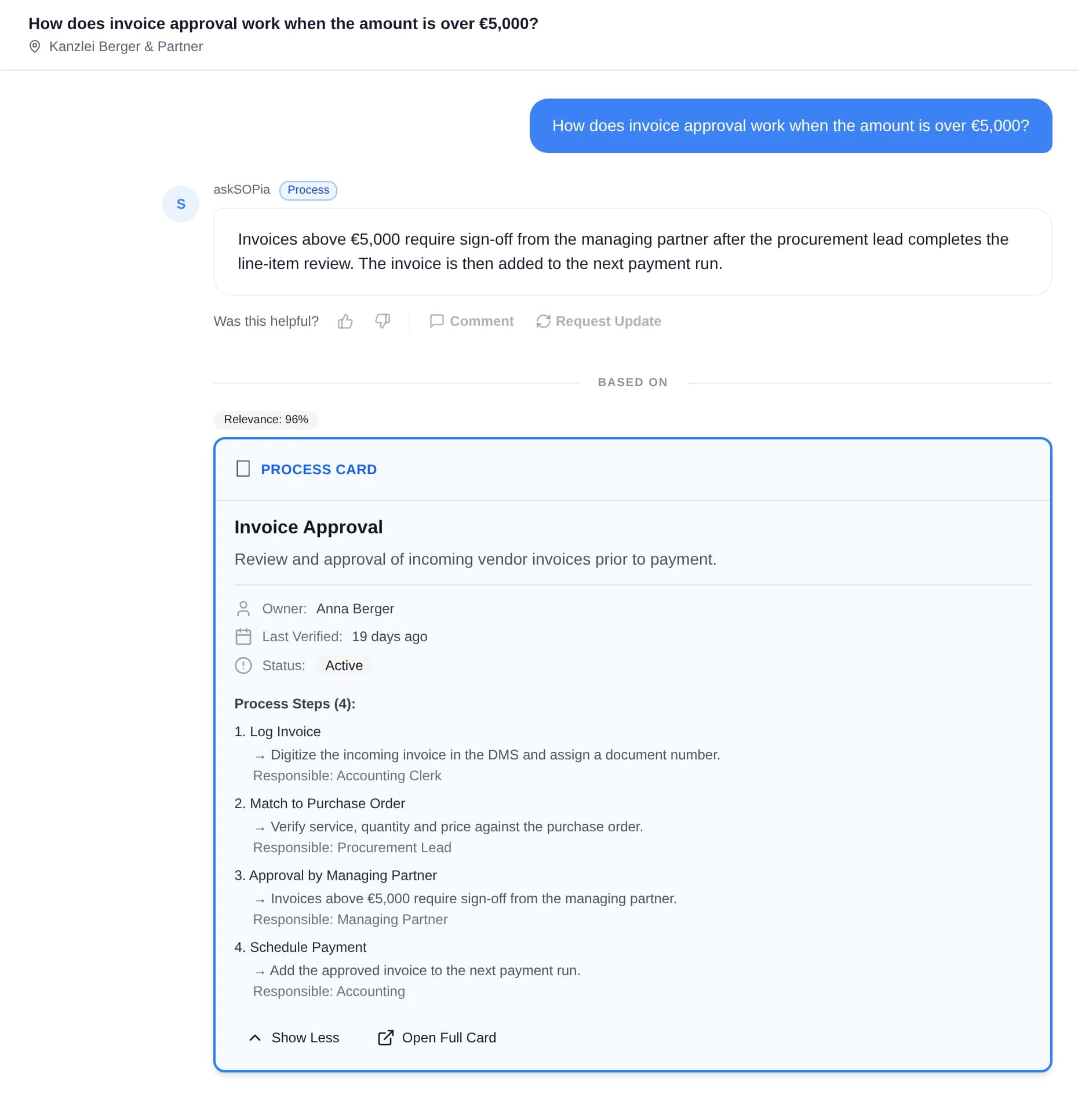
In askSOPia, decisions are extracted automatically from meeting transcripts — with context, rationale, and alternatives — and stored as decision cards. When someone later asks "why do we use Vendor A?", they get the answer with the date, the deciders, and the alternatives evaluated at the time.
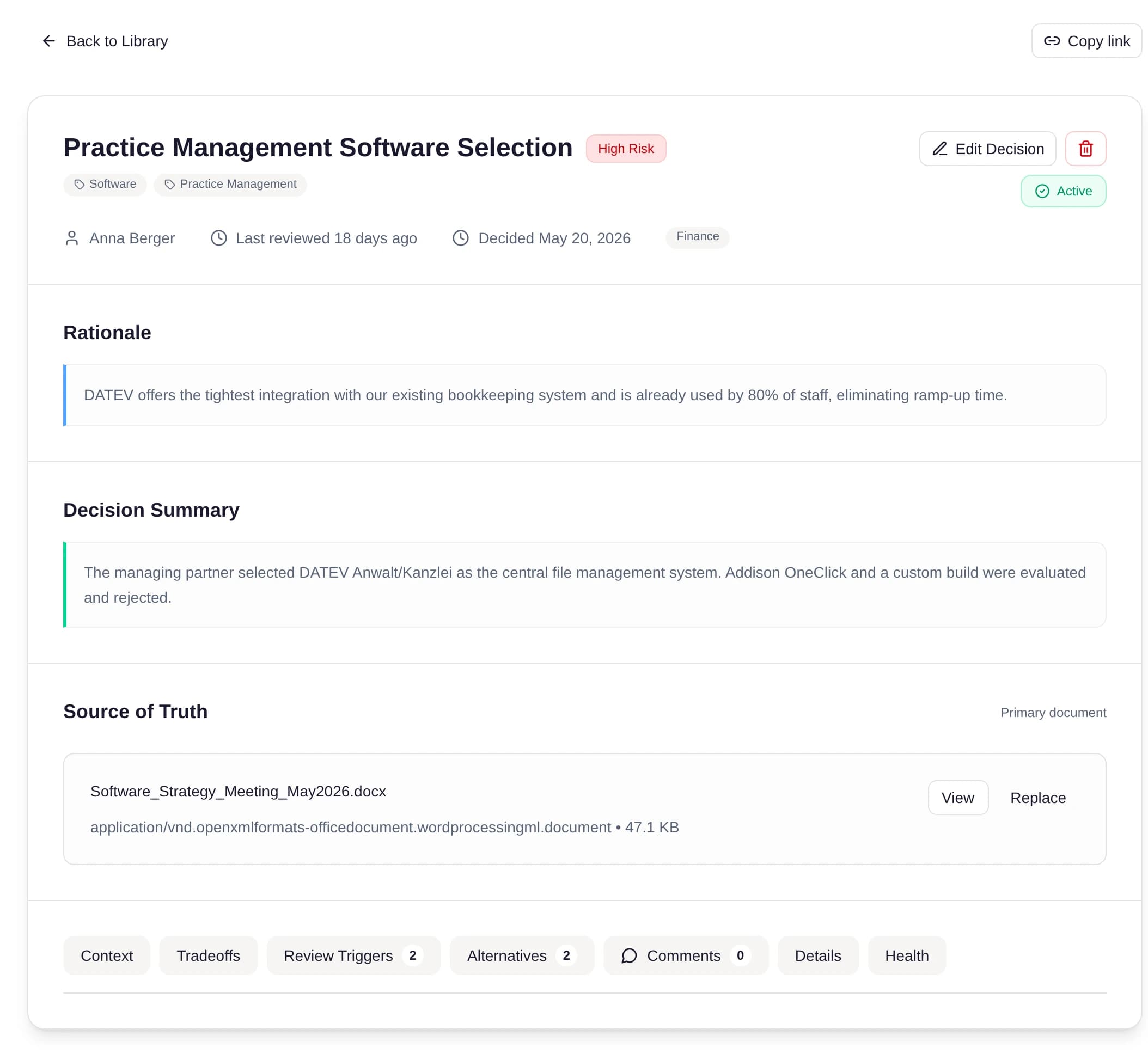
A decision card: rationale, alternatives with pros/cons, trade-offs, and review triggers.
The decision is queryable in chat — with a citation instead of a memory gap.

Frequently Asked Questions

Per decision: title, date and deciders, context, the decision itself, rationale, rejected alternatives, expected outcome with trade-offs, and a review trigger. The alternatives are the most valuable field — they prevent repeat debates.

Any that are hard to reverse, commit money or people, affect multiple teams, or establish a rule. Rule of thumb: if someone could ask "why do we do it this way?" in a year, the decision belongs in the log.

Minutes document a meeting (chronological, found by date); a decision log documents a decision (found by topic, with rationale and alternatives). Minutes answer "what was discussed?" — a decision log answers "why is it this way?".

The principle, yes — one structured note per decision. The format (markdown in a code repository) is inaccessible to non-developers. Business teams need the same structure in a place everyone can search.

Automation plus review triggers: extract decisions directly from meeting transcripts (instead of relying on manual discipline), and give every card a trigger that prompts re-evaluation.

Keep reading

Next Step

Ready to Secure Your Knowledge?

Less than the cost of a bad first month of a mis-hire.

20 minutes. No slides. No prep needed.

Start the knowledge-risk checkSee the Knowledge Sprint